Free nurse schedule template for small hospitals
A weekly Excel scheduling worksheet that calculates required staffing from your census, then flags overtime, rest-hour and consecutive-day violations, leave conflicts, and coverage gaps as you assign shifts.
Most free nurse schedule templates are a blank grid with days across the top. This one is a working nurse scheduling template: it computes how many nurses each day and night shift actually needs from your patient census, and it checks the schedule you build against your own overtime, rest, and consecutive-day rules. You still make every assignment decision. The template does the math and the checking.
What does the template calculate for you?
- Required staff per day and night. Calculated from your census, HPPD, and RN ratios, so you see the target before you assign anyone.
- Weekly hours per nurse. Totalled automatically from the shift codes you assign.
- Overtime flag. OVER appears when a nurse crosses your weekly overtime threshold.
- Consecutive-days flag. OVER appears when a run of worked days passes your max-consecutive rule.
- Rest-hours flag. SHORT appears when back-to-back shifts leave less rest than your rule. A night shift rolling into a day shift is the classic catch.
- Leave-conflict flag. CHECK appears when the grid has someone working on a day the Leave tab says they are off.
- Coverage gap check. Assigned RNs versus required RNs for every day and night. A positive number means you are short.
What do you fill in?
Five input tabs, all marked with orange cells, plus the schedule grid itself. Shift assignments are manual by design: you pick a code (D12, N12, D8, E8, N8, part-time, PTO, and so on) for each nurse each day from a dropdown, and the checks recalculate as you go.
| Staff | Your roster: name, role (RN, LPN, CNA), FTE, and skill flags. |
| Units | HPPD (nursing hours per patient day), day/night split, and the RN share for each unit. |
| Rules | Your overtime threshold, minimum rest hours, max consecutive days, and shift length. |
| Census | The patient census per unit for each day of the week. |
| Holidays and Leave | Public holidays, plus approved PTO, sick, and vacation days. |
What does a nurse schedule example look like?
The Schedule tab, from the sample week that ships inside the file. Day shifts are gold, nights slate, off days grey. The red flags on the right are computed live from the rules you set: David Jones and Sarah Garcia are both over the overtime threshold, Sarah Garcia has also worked six straight days and is scheduled during her approved vacation, and Chris Miller's night shift rolls straight into a day shift with zero rest.
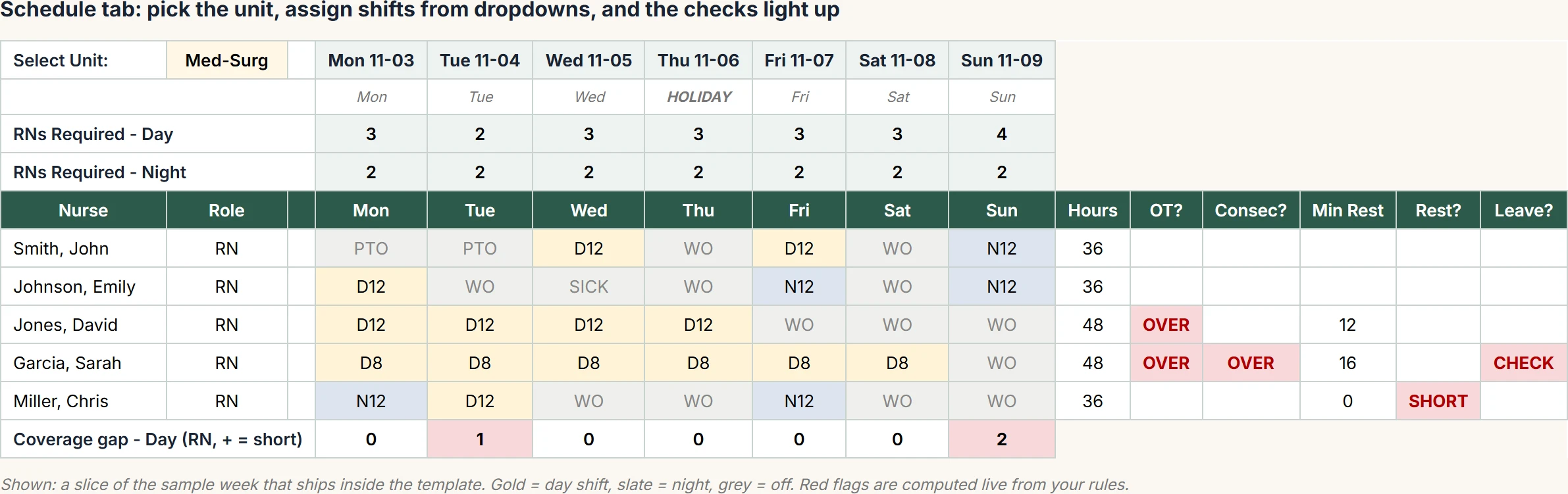
The same sample week as a table, for the first seven nurses. D12 is a 12-hour day shift, N12 a 12-hour night, D8 an 8-hour day. The flags use the sample rules in the file: overtime after 40 hours a week, at least 10 hours of rest between shifts, and no more than five days in a row. The names and hours are sample data, not a real unit.
| Nurse | Role | Mon | Tue | Wed | Thu | Fri | Sat | Sun | Hours | Flag raised |
|---|---|---|---|---|---|---|---|---|---|---|
| John Smith | RN | PTO | PTO | D12 | Off | D12 | Off | N12 | 36 | None |
| Emily Johnson | RN | D12 | Off | Sick | Off | N12 | Off | N12 | 36 | None |
| Michael Williams | LPN | D12 | Off | Off | D12 | Off | Off | D12 | 36 | None |
| Jessica Brown | CNA | D12 | Off | Off | D12 | Off | Off | D12 | 36 | None |
| David Jones | RN | D12 | D12 | D12 | D12 | Off | Off | Off | 48 | Over 40 hours |
| Sarah Garcia | RN | D8 | D8 | D8 | D8 | D8 | D8 | Off | 48 | Over 40 hours; six days in a row; working Saturday during approved vacation |
| Chris Miller | RN | N12 | D12 | Off | Off | N12 | Off | Off | 36 | Monday night runs straight into Tuesday day, zero rest |
Get the template by email
One .xlsx file, about 60 KB, sent to your work email. Sample data included so every output is visible on open; replace it with your own roster and rules. Built for Microsoft Excel 2016 or later.
Work addresses only. We use your details to send the file and may follow up once. Not medical, legal, or compliance advice.
Want the full context first? Read the companion guide: free nurse schedule templates, what works and what doesn't.
How do you use the template?
- Fill the Staff, Units, and Rules tabs with your roster and policies. The sample shows the shape.
- On the Schedule tab, pick your unit and set the week's start date.
- Enter that week's expected census on the Census tab, and any approved leave on the Leave tab.
- Assign a shift code to each nurse for each day from the dropdowns, watching the required rows at the top.
- Fix what the flags catch: clear the OVER, SHORT, and CHECK cells and bring every coverage gap to zero.
What does the template not do?
It will not build the schedule for you, match skills to shifts, balance weekend and holiday fairness across weeks, or find a qualified, non-overtime replacement when a nurse calls out at 3 AM. Its compliance checks see one week at a time. Those limits are not template flaws; they are the honest ceiling of what a spreadsheet can do, and pushing past that ceiling is why nurse scheduling software and operated scheduling services exist. SimpleScheduleAI is the operated version: the AI builds the schedule against all of these rules at once, our scheduling team checks it, and your manager approves it. See how it works.
Frequently asked questions
Is the nurse schedule template really free?
Yes. There is no charge and no trial. Enter your work email, hospital and role, and we email you the Excel file. We send it to hospital and organization addresses only, not personal Gmail or Yahoo accounts. It is the working model our founder built while studying small-hospital scheduling, cleaned up and documented for general use. Every input cell is open; the formula and branding cells are protected so the checks cannot be broken by an accidental keystroke.
Does the template support 8-hour, 10-hour, and 12-hour shifts?
It ships with 12-hour day and night codes, 8-hour day, evening, and night codes, and two 4-hour part-time codes, each carrying real start and end times. A Shift_Basis setting adjusts the staffing math for 8-hour or 12-hour coverage models. Ten-hour patterns can be added on the Shifts tab in about a minute.
Does the template build the schedule automatically?
No, and no spreadsheet honestly can at this level of constraint. You assign each nurse a shift code from a dropdown; the template then calculates required staffing, hours, overtime, rest-hour and consecutive-day compliance, leave conflicts, and coverage gaps. The judgment stays with your nurse manager.
Will it work in Google Sheets?
It is built and tested for Microsoft Excel. The formulas it uses also exist in Google Sheets, so it generally imports, but the conditional-formatting colors may need re-applying after import. For full fidelity, use Excel.
When does a template stop being enough?
When callouts, fairness tracking, and compliance documentation consume more manager time than the template saves. The template flags problems after you assign; it cannot prevent them, remember them across weeks, or find a qualified replacement at 3 AM. That is the point where hospitals move to a scheduling service or software.
Rather review a finished schedule than build one?
Flat monthly pricing for small Texas hospitals. The AI builds the schedule, our scheduling team checks it, you approve it.
See how it works →